Updated June 23, 2026. Carrd pricing is one of the biggest reasons creators, freelancers, affiliate marketers, coaches, and small business owners consider Carrd before larger website builders. The paid plans are still unusually inexpensive compared with Wix, Squarespace, Webflow, Framer, Leadpages, Unbounce, Landingi, and many other website or landing-page tools.
But the cheapest Carrd plan is not always the best business plan. The real decision is not simply “free vs paid.” It is whether your page needs a custom domain, forms, analytics, embeds, SEO meta tags, payment widgets, automation, redirects, password protection, or exported site files. Those features determine which Carrd plan makes sense.
SmartBizTools Internal Reading Path
This pricing guide is part of the SmartBizTools Carrd content cluster. Use these related guides to compare Carrd from different buyer angles:
- Carrd Review 2026 – full verdict, features, pros, cons, SEO limits, and alternatives.
- Best Carrd Alternatives – compare Carrd with Wix, Framer, Webflow, Squarespace, Linktree, Beacons, Leadpages, Unbounce, Landingi, WordPress.com, and Systeme.io.
- Carrd SEO Guide – how to rank a one-page Carrd site and when Carrd is not enough for SEO.
- Carrd for Affiliate Marketing – how to use Carrd for bridge pages, disclosures, lead capture, and affiliate links.
- Carrd vs Linktree – best choice for creator bio pages and social traffic.
- Carrd vs Wix – best choice for a one-page site vs a full small business website.
- SmartBizTools AI Tools Directory – find AI writing, SEO, design, analytics, and automation tools to pair with Carrd.
Carrd Pricing at a Glance
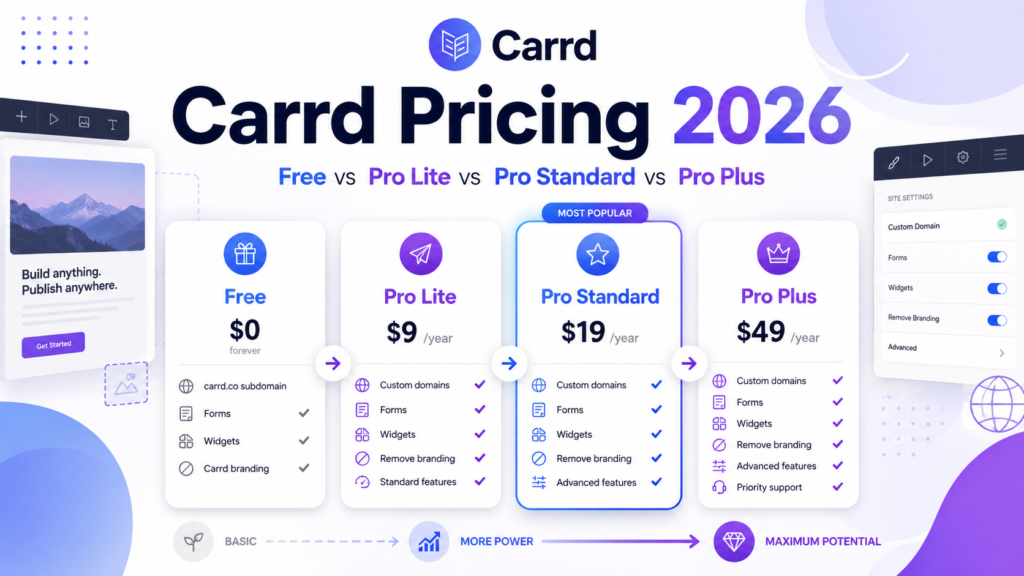
According to Carrd’s current Pro plans documentation, Carrd has three Pro plans: Pro Lite, Pro Standard, and Pro Plus. The official pricing listed in the documentation is $9/year for Pro Lite, $19/year for Pro Standard, and $49/year for Pro Plus.
| Plan | Current official price | Site allowance | Best for | Main limitation |
|---|---|---|---|---|
| Free Basic | $0 | Basic publishing | Testing Carrd, mockups, simple personal pages, and learning the editor. | Not enough for most serious business use because the strongest Pro features are missing. |
| Pro Lite | $9/year | 3 sites | Simple personal pages, portfolios, profiles, and lightweight pages that do not need a custom domain or forms. | No custom domain, no forms, no widgets, no embeds, no analytics integrations, and no custom meta tags. |
| Pro Standard | $19/year | 10 sites | Most creators, freelancers, affiliate marketers, lead capture pages, landing pages, and small business pages. | Does not include advanced forms, password protection, redirects, custom site files, canonical URLs, or downloadable site source files. |
| Pro Plus | $49/year | 25 sites | Power users, agencies, advanced affiliate pages, automation-heavy forms, gated pages, redirect needs, and technical SEO control. | Still not a full CMS, blog platform, ecommerce store, or AI website builder. |
Which Carrd Plan Should You Choose?
| Your situation | Recommended plan | Why |
|---|---|---|
| You are only testing Carrd or learning the editor | Free Basic | Start free until you know whether Carrd’s one-page format fits your project. |
| You want a simple personal profile without a custom domain | Pro Lite | It removes branding, unlocks premium URLs, improves media support, and remains very cheap. |
| You want a real business page on your own domain | Pro Standard | Custom domains, SSL, forms, widgets, embeds, analytics, and meta tags are the features most businesses actually need. |
| You want a lead capture page or newsletter signup page | Pro Standard | Forms and integrations are the key upgrade reason. Free and Pro Lite are too limited for serious lead capture. |
| You want an affiliate bridge page with tracking and disclosure | Pro Standard or Pro Plus | Standard handles domains, embeds, analytics, and meta tags. Plus is better if you need advanced forms, redirects, canonical URLs, or site files. |
| You need custom form routing, automation, or payment form workflows | Pro Plus | Advanced forms can integrate with Zapier, Make, n8n, Airtable, URLs, Stripe Checkout, and more. |
| You need password-protected pages | Pro Plus | Password protection is a Pro Plus feature. |
| You need a blog, CMS, large SEO site, or full ecommerce store | Use another platform | Compare Carrd alternatives such as WordPress.com, Webflow, Wix, Squarespace, Systeme.io, Leadpages, Landingi, or Shopify-style ecommerce tools. |
Free Basic: Good for Testing, Weak for Business
Carrd’s free Basic experience is useful because it lets you learn the editor and publish simple pages without paying. That makes it a low-risk way to test a layout, personal profile, portfolio concept, one-page resume, basic link page, or early landing-page idea.
The problem is that business use usually needs more than a page that merely exists. A serious page often needs a branded domain, lead capture, analytics, SEO meta tags, embeds, and third-party integrations. Those are the exact areas where the free plan becomes limiting.
Use the free plan if:
- You are evaluating Carrd before committing.
- You are building a non-commercial personal page.
- You do not need a custom domain yet.
- You do not need forms, analytics, embeds, or meta-tag control.
- You want to draft a page before upgrading.
Do not rely on the free plan if:
- You want to use Carrd for a business, agency, affiliate campaign, or lead magnet.
- You care about brand trust from a custom domain.
- You need email signup forms or contact forms.
- You need analytics to measure conversions.
- You want stronger SEO controls.
Pro Lite: Cheap, But Not the Best Business Plan
Pro Lite costs $9/year and includes 3 sites. It is the entry-level paid plan and improves the free experience with no Carrd branding, premium URLs, premium templates, high-quality images, larger media uploads, video uploads, slideshows, site icons, share images, QR codes, custom templates, site transfers, sharing, and no element limit.
The important analytical point is that Pro Lite is not the plan most businesses should pick. It is inexpensive, but it intentionally excludes the business features Carrd users usually upgrade for: custom domains, forms, widgets, embeds, analytics, and meta tags.
Best Pro Lite use cases
- Personal portfolio on a Carrd URL.
- Simple profile page without lead capture.
- Event page or temporary page that does not need a custom domain.
- Low-budget creator page where the main upgrade need is removing Carrd branding.
- Design experiments that need premium templates or higher-quality media.
Why Pro Lite can be a false economy
Pro Lite is only $10/year cheaper than Pro Standard. If your page needs a custom domain, signup form, analytics, embedded checkout, email capture, or meta tags, paying for Pro Lite first can slow you down because you will still need to upgrade. For most business readers, the real comparison is not Free vs Pro Lite. It is Pro Standard vs Pro Plus.
Pro Standard: The Best Value for Most Users
Pro Standard costs $19/year and includes 10 sites. This is the plan SmartBizTools recommends for most Carrd business users because it unlocks the features that turn Carrd from a simple page builder into a practical landing-page and lead-capture tool.
Pro Standard includes custom domain URLs with SSL, no branding, high-quality media, unlimited elements, premium templates, custom templates, video uploads, slideshows, site icons, share images, QR codes, transfers, sharing, forms, widgets, embeds, analytics, meta tags, and local fonts.
Why Pro Standard is the business baseline
- Custom domain: A branded domain is more trustworthy for businesses, creators, affiliate campaigns, and paid traffic.
- Forms: You can collect contact requests, newsletter signups, customer feedback, and lead magnet submissions.
- Widgets: Carrd can embed services such as Stripe, PayPal, Gumroad, Typeform, and Facebook widgets.
- Embeds: You can add your own code and external content, which is useful for tracking, video, booking, payment, and newsletter tools.
- Analytics: Carrd supports optional analytics and tracking tools such as Google Analytics, Plausible, Matomo, and others.
- Meta tags: You can add custom meta tags for ownership verification, robots instructions, and related use cases.
Best Pro Standard use cases
- Small business one-page site.
- Freelancer portfolio with inquiry form.
- Creator landing page with email signup.
- Affiliate bridge page with analytics and disclosure.
- Newsletter landing page.
- Lead magnet page.
- Simple startup MVP page.
- Paid ad landing page where you do not need A/B testing inside Carrd.
Pro Plus: Best for Power Users and Technical Control
Pro Plus costs $49/year and includes 25 sites. It includes the Pro Standard feature set and adds advanced tools for people who need more control over forms, redirects, site files, SEO settings, access control, and exported site files.
Pro Plus adds advanced forms, advanced settings, downloadable site files, redirects, password protection, variables, site files, update frequency, and canonical URL control.
When Pro Plus is worth it
- You need advanced forms that connect to automation systems such as Zapier, Make, n8n, Airtable, or custom URLs.
- You want to incorporate Stripe Checkout into more advanced form/payment workflows.
- You need redirects because you are moving pages or preserving existing URLs.
- You need password protection for a private page, client preview, gated resource, or limited-access page.
- You need custom site files such as robots.txt or ads.txt.
- You care about canonical URL control for SEO hygiene.
- You want to download unminified HTML, CSS, JS, and images from Carrd-built sites.
- You manage many small one-page sites for yourself or clients.
When Pro Plus is not enough
Pro Plus adds technical control, but it does not turn Carrd into WordPress, Webflow, Shopify, Wix, Squarespace, or a full CMS. If your roadmap includes blogging, ecommerce catalog management, user accounts, complex databases, product inventory, built-in A/B testing, or programmatic SEO, compare Carrd alternatives before upgrading.
Carrd Pricing Compared by Feature
| Feature | Free Basic | Pro Lite | Pro Standard | Pro Plus |
|---|---|---|---|---|
| Annual price | $0 | $9/year | $19/year | $49/year |
| Published sites | Basic publishing | 3 sites | 10 sites | 25 sites |
| Remove Carrd branding | No | Yes | Yes | Yes |
| Custom domains | No | No | Yes, with SSL | Yes, with SSL |
| Forms | No | No | Yes | Yes, plus advanced forms |
| Widgets | No | No | Yes | Yes |
| Embeds/custom code | No | No | Yes | Yes |
| Analytics integrations | No | No | Yes | Yes |
| Custom meta tags | No | No | Yes | Yes |
| Redirects | No | No | No | Yes |
| Password protection | No | No | No | Yes |
| Canonical URL control | No | No | No | Yes |
| Custom site files | No | No | No | Yes |
| Download site files | No | No | No | Yes |
Real Cost Analysis: Why Carrd Feels So Cheap
Carrd looks inexpensive because pricing is annual and the product stays focused. A full business website builder might charge $15 to $40 per month for features that Carrd offers in a one-page context for $19 to $49 per year. That is a massive pricing advantage for simple pages.
However, Carrd’s low price is partly possible because it does not include everything. You may still need extra tools for email marketing, CRM, checkout, analytics, heatmaps, scheduling, automation, SEO research, copywriting, or A/B testing. The smart way to analyze Carrd pricing is to calculate the full stack, not only the Carrd subscription.
Example stack costs to consider
- Domain: Carrd does not replace domain registration. You still need to buy or own a domain if you want a branded URL.
- Email marketing: Carrd forms can connect to email tools, but your email platform may have its own pricing.
- Payments: Stripe, PayPal, Gumroad, or other payment tools may charge processing fees.
- Analytics: Google Analytics is free, but paid analytics tools such as Plausible or Matomo Cloud may cost extra.
- SEO tools: Keyword research, rank tracking, and content optimization may require external tools.
- Automation: Zapier, Make, n8n hosting, or Airtable may add cost if you build advanced workflows.
Carrd Pricing for SEO
Carrd can support basic SEO, but it is not a full SEO publishing platform. Every Carrd site includes a sitemap.xml file that can be submitted to search engines. Carrd also supports custom meta tags on Pro Standard or higher. Pro Plus adds canonical URL control and site files, which can help with more technical SEO needs.
For a single focused page, Pro Standard is usually enough. It gives you the custom domain, meta tags, analytics, and embeds needed for a serious one-page SEO attempt. For more technical control, Pro Plus is better. For large content SEO, use a CMS such as WordPress.com, Webflow, or another platform covered in Carrd alternatives.
SEO recommendation by plan
- Free Basic: acceptable for testing, weak for SEO strategy.
- Pro Lite: still weak for SEO because it lacks custom domains and meta tags.
- Pro Standard: best minimum plan for one-page SEO.
- Pro Plus: best Carrd plan for technical SEO control.
Carrd Pricing for Affiliate Marketing
Carrd is attractive to affiliate marketers because the yearly cost is low and one-page bridge pages are easy to build. But affiliate marketing requires trust, tracking, disclosure, and conversion structure. That makes Pro Standard the minimum plan most affiliate marketers should consider.
With Pro Standard, you can use a custom domain, add analytics, embed forms or checkout widgets, and add meta tags. With Pro Plus, you can add redirects, canonical URLs, custom site files, advanced forms, password protection, and more technical control.
Affiliate plan recommendation
- Use Pro Standard for simple affiliate bridge pages, resource pages, comparison pages, lead magnets, and newsletter opt-ins.
- Use Pro Plus if you need automation-heavy forms, redirects, technical SEO control, or multiple client/campaign pages.
- Do not use Free or Pro Lite for serious affiliate campaigns unless the page is only a temporary mockup.
For a more detailed workflow, read How to Use Carrd for Affiliate Marketing.
Carrd Pricing vs Alternatives
Carrd is cheaper than most website builders, but price is not the only decision. Carrd wins when you need a simple one-page site. Alternatives win when you need blogging, ecommerce, AI website generation, CMS workflows, A/B testing, deep analytics, or larger site architecture.
| Need | Is Carrd pricing attractive? | Better alternative if Carrd is too limited |
|---|---|---|
| Simple one-page website | Yes, very attractive | Carrd is usually enough |
| Creator link-in-bio page | Yes | Linktree, Beacons, Taplink |
| Full small business website | Maybe | Wix, Squarespace, WordPress.com |
| Design-led startup site | Maybe | Framer or Webflow |
| SEO blog or content hub | No | WordPress.com, Webflow, or another CMS |
| Ecommerce store | No, unless using embeds | Squarespace, Wix, Shopify-style tools, WordPress.com Commerce |
| Paid ad landing pages with testing | Maybe for simple pages | Leadpages, Unbounce, Landingi |
| Funnels, courses, email, affiliate program | No | Systeme.io or funnel platforms |
Upgrade Decision Framework
Use this simple decision flow before choosing a plan:
- Start with the page goal. Is it a profile, lead page, affiliate page, landing page, or mini business site?
- Check domain needs. If you need a custom domain, skip Free and Pro Lite.
- Check lead capture. If you need forms, skip Free and Pro Lite.
- Check measurement. If you need analytics/tracking, choose Pro Standard or Pro Plus.
- Check SEO needs. If you need meta tags, choose Pro Standard or Pro Plus; if you need canonical/site-file control, choose Pro Plus.
- Check automation needs. If you need advanced forms or custom routing, choose Pro Plus.
- Check content needs. If you need blog posts, categories, or large SEO content, choose a Carrd alternative.
When Carrd Pricing Is a Great Deal
Carrd is a great deal when the business problem is narrow and the page has one primary action. Examples include joining a newsletter, booking a call, downloading a lead magnet, clicking an affiliate offer, viewing a portfolio, applying for a waitlist, or routing social traffic to a few important links.
In these cases, Carrd’s low annual pricing means you can launch quickly and spend more budget on copywriting, traffic, email marketing, SEO, analytics, or paid tools that actually improve conversion.
When Carrd Pricing Can Become Misleading
Carrd becomes less attractive when users expect it to behave like a full website platform. The yearly cost is low, but the missing functionality can become expensive if you need multiple other tools to fill gaps.
For example, if you need a blog, checkout system, analytics dashboard, email automation, SEO plugin ecosystem, user accounts, and A/B testing, Carrd may look cheap at first but become less efficient than using a platform built for that workflow.
Plan Names Changed Since Writing?
As of this update, Carrd’s official Pro plans documentation still uses the same three plan names: Pro Lite, Pro Standard, and Pro Plus. Pricing in the documentation remains $9/year, $19/year, and $49/year. If Carrd changes plan names or pricing later, this article should be updated because pricing pages and documentation can change without much warning.
Any Screenshots Used in This Article?
No product screenshots are used in this updated pricing guide. That is intentional. Pricing screenshots can become stale quickly if a plan name, price, feature list, trial offer, or checkout page changes. Instead, this article links to official Carrd documentation and explains the pricing logic in text and tables.
If screenshots are added later, they should be current, dated, compressed, and captioned with the source and capture date. Do not use fake screenshots, fake dashboards, fake pricing tables, fake ratings, or generated images that look like official Carrd UI.
Final Recommendation
For most SmartBizTools readers, the best Carrd pricing choice is Pro Standard at $19/year. It is inexpensive enough for beginners but includes the features that matter for real business use: custom domains, forms, widgets, embeds, analytics, and meta tags.
Choose Pro Lite only if you are sure you do not need a custom domain, forms, analytics, embeds, or SEO meta tags. Choose Pro Plus if you need advanced forms, redirects, password protection, canonical URLs, site files, exported site files, or more technical control.
If you are trying to build a full business website, SEO content site, online store, or advanced funnel system, do not force Carrd to do work it was not designed for. Compare options in the Carrd alternatives guide and browse the SmartBizTools AI Tools Directory for writing, SEO, design, analytics, and automation tools to complete your stack.
Official Sources Checked
- Carrd Pro plans documentation
- Carrd Pro features documentation
- Carrd meta tags documentation
- Carrd sitemap documentation
FAQ
Is Carrd free?
Yes. Carrd has a free Basic experience that is useful for testing and simple pages. Most business users should expect to upgrade because custom domains, forms, analytics, embeds, and meta tags are Pro features.
How much does Carrd Pro cost?
Carrd’s current documentation lists Pro Lite at $9/year, Pro Standard at $19/year, and Pro Plus at $49/year.
Which Carrd plan is best?
Pro Standard is the best Carrd plan for most users because it includes custom domains, forms, widgets, embeds, analytics, and meta tags at a very low annual price.
Is Carrd Pro Lite worth it?
Pro Lite is worth it for simple personal pages that do not need custom domains, forms, widgets, embeds, analytics, or meta tags. It is not the best plan for most business pages.
Is Carrd Pro Plus worth it?
Pro Plus is worth it if you need advanced forms, redirects, password protection, variables, site files, canonical URLs, update frequency control, or downloadable site files.
Can Carrd handle ecommerce?
Carrd can embed third-party payment and commerce tools such as Stripe, PayPal, and Gumroad widgets, but it is not a full ecommerce platform. For stores with product catalogs, inventory, and advanced checkout, compare ecommerce-ready website builders.
Can Carrd rank on Google?
Yes, Carrd sites can rank for focused one-page queries. Every site includes a sitemap.xml file, and Pro Standard or higher supports custom meta tags. For larger SEO content strategies, use a CMS or publishing platform instead.